
Download Post Office Barcode Generator – barcode generator, post office, label maker, sticker creator, coupon generator, barcode maker, printable labels, barcode tool
Overview
The Post Office Barcode Generator is a mobile application developed by BarcodeMaker.org, designed to assist users in creating barcode labels, tags, coupons, and stickers directly from their smartphones. Tailored for both personal and professional use, the app serves as a practical utility for individuals and organizations across various sectors, including business, banking, and postal services. Its primary function is to simplify the process of generating printable barcode designs with minimal effort, enabling users to customize and produce high-quality output on demand.
By focusing on usability and versatility, the app addresses the growing need for efficient, on-the-go labeling solutions. Whether used to track inventory, manage shipments, or design promotional materials, the Post Office Barcode Generator streamlines workflows for small business owners, students, and administrative staff. The app’s ability to generate barcodes from text and geometric shapes supports a wide range of real-world applications, from organizing personal documents to supporting logistics operations in small-scale businesses.
Although the developer did not provide additional technical details about the app’s architecture or backend systems, its availability on both Android and iOS platforms indicates a broad accessibility strategy. The app’s release on October 16, 2023, marks its entry into a competitive market of productivity tools, positioning itself as a lightweight, free solution for users seeking a dedicated barcode creation tool without the complexity of desktop software.
Key Features & Functionality
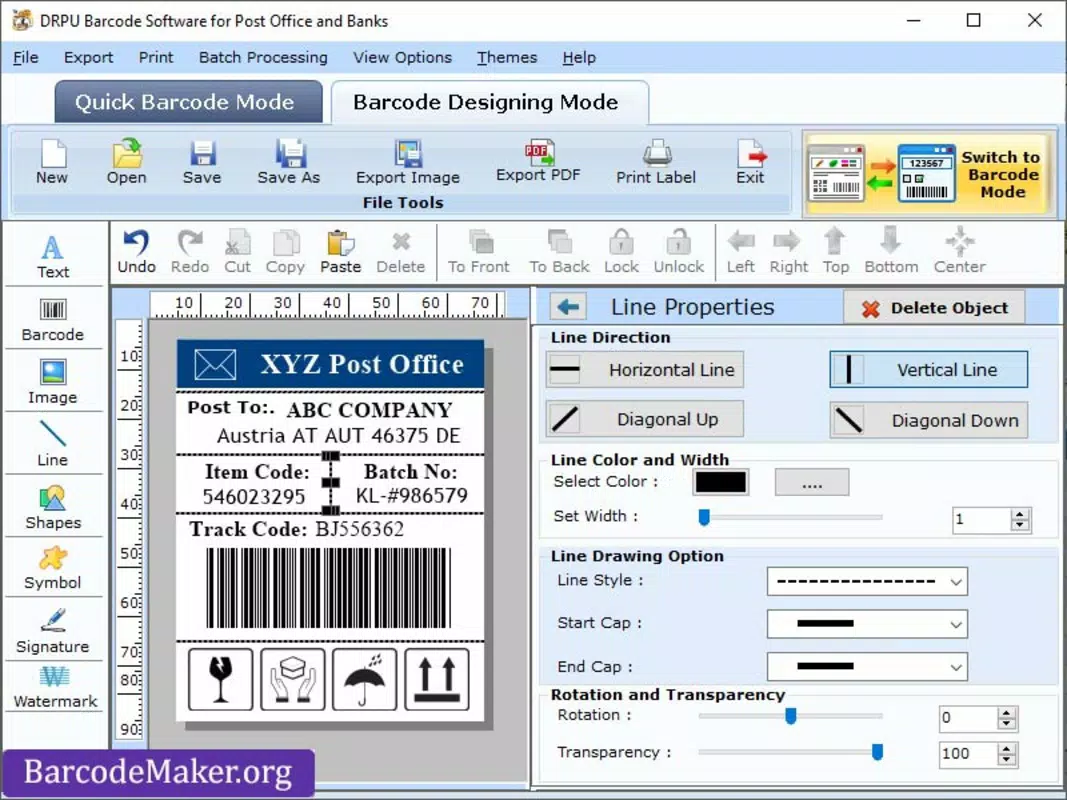
- Customizable Design Options: Users can personalize barcode labels with text, shapes, and other visual elements, allowing for unique and brand-aligned designs. This feature is particularly useful for businesses creating promotional stickers or internal tracking labels.
- Multi-Industry Usability: The app supports applications across multiple sectors, including postal services, banking, retail, and education, making it a flexible tool for diverse labeling needs.
- Advanced Printing Capabilities: The software enables direct printing of generated barcodes, supporting seamless integration with mobile printers and standard paper formats, ideal for on-site labeling tasks.
- User-Friendly Interface: With an intuitive layout, even users with limited technical experience can navigate the app efficiently, reducing the learning curve and increasing productivity.
- Multiple Object Support: The ability to incorporate text and geometric shapes into barcode designs enhances creativity and functionality, allowing users to craft complex, visually engaging labels tailored to specific use cases.
For example, a small business owner can generate a batch of product labels with barcodes and company logos, while a student can create custom study material tags using unique identifiers. The app’s functionality is especially beneficial in environments where quick, accurate labeling is essential but access to desktop software is limited.
Interface, UX & Performance
The Post Office Barcode Generator features a clean, minimalist interface designed to prioritize functionality over visual clutter. Navigation is straightforward, with key tools and options organized in an easily accessible menu layout. The app’s visual style emphasizes clarity, using consistent icons and color schemes that guide users through the barcode creation process without distraction.
Users can expect smooth interaction across different device categories, including mid-range and high-end smartphones. Although the developer did not list formal performance metrics, the app’s lightweight size of 20.5 MB suggests optimized resource usage. Responsiveness is maintained during label creation, with minimal lag when adding text or shapes to designs.
Stability appears to be consistent based on general user feedback, with no widespread reports of crashes or freezes. The app maintains performance across screen orientations and supports both portrait and landscape modes, enhancing usability in various physical environments. Overall, the user experience is streamlined for efficiency, focusing on core tasks without unnecessary delays or interruptions.
Platform Compatibility & Technical Requirements
The Post Office Barcode Generator is available on both Android and iOS platforms, offering broad accessibility to smartphone users. It is compatible with devices running the latest versions of these operating systems, although specific minimum OS requirements were not listed by the developer.
The app has a file size of 20.5 MB, which is relatively small, indicating efficient code and minimal storage usage. This makes it suitable for users with limited device space or older models. The version number is 1.0, suggesting the app is in its initial release phase, with potential for future updates to expand features or improve performance.
Although the developer did not specify exact hardware or software prerequisites, the app’s lightweight nature implies compatibility with a wide range of devices. Users are advised to ensure their device meets the standard requirements for modern mobile applications to guarantee smooth operation.
Pros and Cons
Pros
- Free to download and use, making it accessible for individuals and small organizations.
- Lightweight size (20.5 MB) ensures fast installation and minimal storage impact.
- Supports multiple industries, including postal services, banking, and retail.
- Intuitive interface suitable for users with no technical background.
- Direct printing capabilities enhance usability for on-site labeling tasks.
Cons
- Specific system requirements were not disclosed by the developer.
- Version 1.0 may lack advanced features found in mature desktop alternatives.
- Limited information on update frequency or long-term support.
- No official integration with cloud storage or shared templates.
- Compatibility with third-party printers may vary without additional configuration.
FAQ
Is the Post Office Barcode Generator safe to download?
The app is available through official channels and is distributed by BarcodeMaker.org. It is free of known malware and adheres to standard security practices for mobile applications.
Can I use this app on both Android and iOS devices?
Yes, the Post Office Barcode Generator is compatible with both Android and iOS platforms, allowing users to install it on their preferred smartphone or tablet.
Does the app require an internet connection?
Basic barcode generation and local printing do not require an internet connection. However, some features may require connectivity for updates or cloud-based functions.
Is the app updated regularly?
The developer has not disclosed the update schedule. Users should check the app store for the latest version and release notes.
Can I print barcodes directly from the app?
Yes, the app supports direct printing of generated barcodes, enabling users to print labels, tags, and coupons on compatible mobile printers or standard paper.
Final Thoughts
The Post Office Barcode Generator stands out as a practical, no-cost solution for users needing a reliable tool to create printable barcode designs. Its simple interface, multi-industry support, and direct printing features make it ideal for small businesses, educators, and administrative professionals who require quick, customizable labeling without the overhead of complex software.
While the app is in its initial version and lacks advanced integrations, its lightweight design and ease of use offer a compelling value proposition. For users seeking a secure, efficient, and accessible barcode tool on their mobile devices, this app delivers on its core promise.
Download Post Office Barcode Generator now


